How to Make a Free QR Code for a Link, WiFi or Contact Card
Make a QR code for a link, WiFi password, WhatsApp chat or contact card. Add your logo, download SVG or PNG. Free, no signup, and it never expires.
 Noman Mustafa Owner
- Published
- Updated
- Reading time9 min

On this page 15 sections
A cafe owner wants the WiFi password on the table cards. Not printed, because people mistype it anyway. Just a little square they point a phone at.
That takes about a minute with this free QR code generator, and it costs nothing.
Pick what the code should do, type in your details, download the file. No account unless you want one.
How to make a QR code
Start by picking a type from the list on the left. Website URL is the common one, but there are 18 to choose from, including WiFi, WhatsApp and Contact.
Then fill in your details. A link, a phone number, a password, whatever that type asks for. The preview on the right redraws itself while you type, so you'll see the code appear a character at a time.
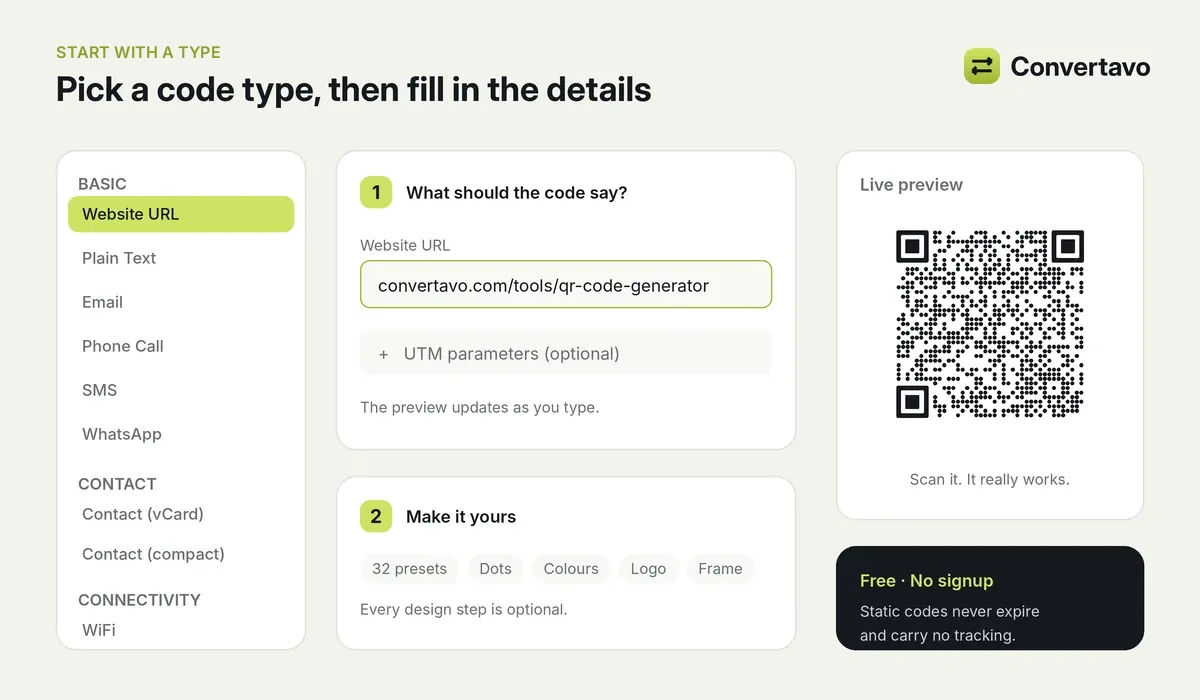
Pick a type, fill in your details, and the preview redraws as you type.
Now comes the part you can skip. Colours, dot shape, corner style, a frame with "Scan me" on it, your logo in the middle. All optional. The plain black code works perfectly well, and plenty of people stop right here.
If you do want it to look like something, there are 32 ready-made styles to start from. There's also a Surprise me button for when nothing feels right and you've been staring at colour pickers for ten minutes.
Before you download, glance at the scan check. It warns you if a design has gone too far for phones to read.
Last step: pick a format and download. SVG, PNG, PDF or EPS. Static codes need no account at all.
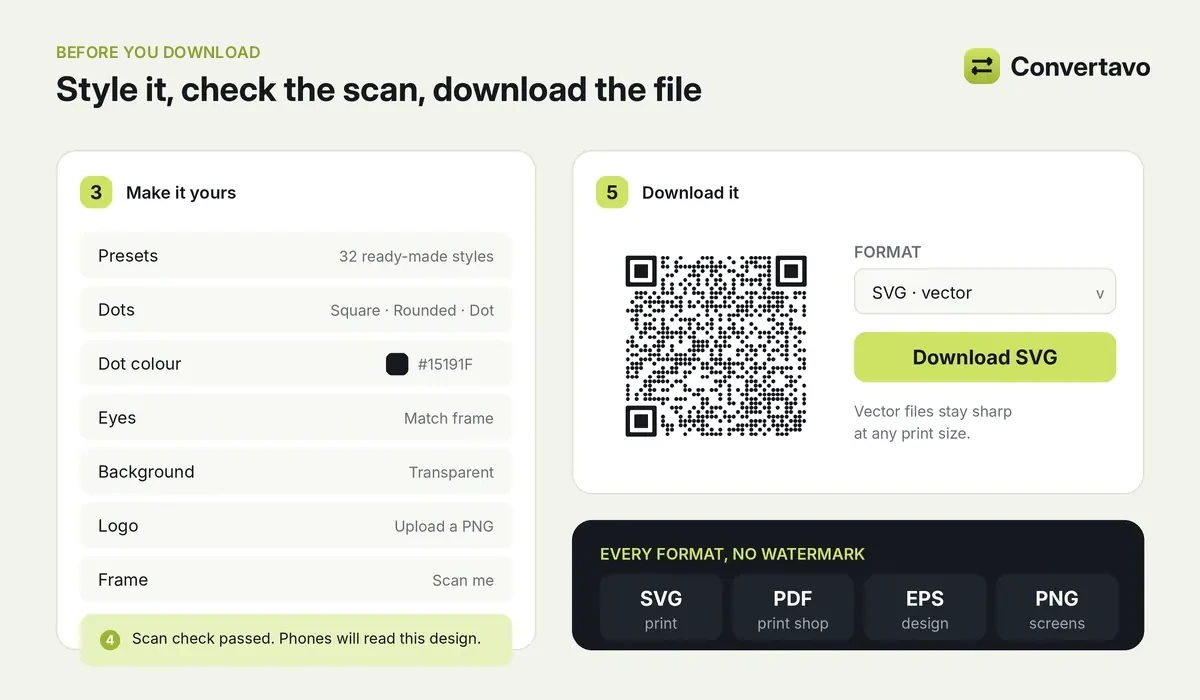
Style it if you want to, check it still scans, then download.
One thing worth knowing if you're making a code for a website. Open UTM parameters under the link box. UTM tags are short labels that tell your analytics where a visit came from, so you'll be able to see which poster or flyer actually worked.
What kinds of QR codes can you make?
Most people need a link. But the type you pick changes what the phone does after the scan, and that's where it gets useful.
Code type | What happens when someone scans it |
|---|---|
Website URL | Opens the page you entered |
Plain Text | Shows your text on the screen |
Opens a new email addressed to you | |
Phone Call | One tap to call your number |
SMS | Opens a text message to you |
Opens a chat with you, with a message already typed if you want | |
Contact (vCard) | Saves your name, phone, email and company to their contacts |
Contact (compact) | Same thing in the smaller MeCard format, better for tiny prints |
WiFi | Joins your network without anyone typing a password |
Location | Drops a pin on a map |
Calendar Event | Adds your event to their calendar |
Crypto, PayPal, SEPA, UPI, merchant | Opens a payment with your details filled in |
Social profile | Opens your profile on a social network |
The WiFi one
Pick WiFi, then type the network name and password. The network name is called the SSID, and it's whatever shows up in the list when you look for networks.
You'll also pick a security type: WPA/WPA2, WPA3, WEP, or none. WPA2 is what most home and cafe routers use. Tick the hidden network box only if your router doesn't broadcast its name.
Guests point a camera at it and they're on. Nobody spells out a password across a room again.
The WhatsApp one
Enter your country code and number. You can add a message too, so it's sitting there ready when the chat opens.
Customers never have to save your number first, which is the bit that usually stops people from messaging. Works well on a shop counter, a delivery bag or the back of a card.
The business card one
Use Contact (vCard). One scan drops your name, phone, email and company straight into their contacts. No typing, no misspelled surname.
If space is tight, Contact (compact) uses MeCard instead. Fewer characters means fewer dots, and fewer dots survive a small print much better. Keep it at 2 x 2 cm or bigger and download SVG, PDF or EPS so it stays sharp.
The map one
Pick Location, enter the latitude and longitude, then choose the Google Maps format.
Finding those numbers is easier than it sounds. Open Google Maps on a computer, right-click the exact spot, and the coordinates sit right at the top of the menu that appears. Copy them from there.
Static or dynamic: which one do you need?
This is the choice that matters most, and it's the one nobody explains properly.
A static code carries its content inside the pattern itself. Free, permanent, works without our servers. The catch is that once it's printed, what it says is fixed forever.
A dynamic code carries a short link instead. You can repoint it after printing, and you can see how many times it was scanned.
Static QR code | Dynamic QR code | |
|---|---|---|
Cost | Free, no account | Paid plan |
Change the content after printing | No | Yes |
See how many scans | No, there is no tracking | Yes |
Expires | Never | Works while it is active in your account, and you can pause it |
Good for | WiFi, contact cards, links that will not move | Menus, flyers, packaging, anything printed in quantity |
Simple way to decide. If the destination will never move, go static. If you're printing 2,000 of something and the link might change next year, a dynamic code is cheaper than a reprint.
Adding a logo without wrecking the scan
A logo sits on top of part of the pattern, so some of the code disappears under it. The QR code generator compensates by raising the error correction, which is spare data built into every code so a phone can still read it with pieces missing.
There's a limit to that, though. Push it too far and you get a pretty square that nothing can read.
What actually helps:
Simple logos beat detailed ones. Bold shapes survive, fine lines don't
Smaller is safer. Every millimetre of logo is pattern you're covering up
Dark code on a light background, always
A logo with a clean background works best. Remove Background will cut yours out if it still has a white box around it
Then run the scan check before you download. It'll tell you if you went too far.
How big should a printed QR code be?
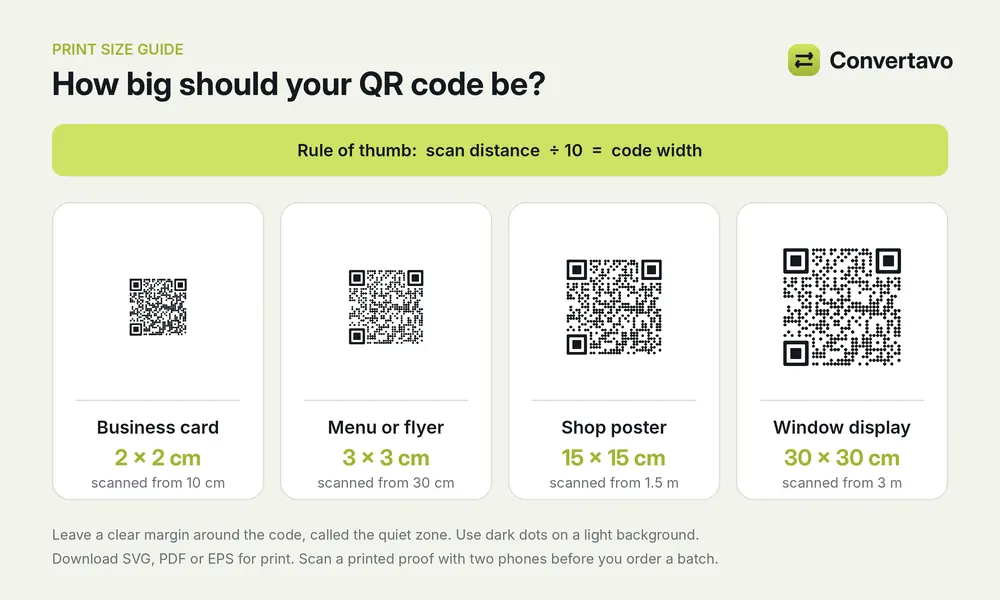
Scanning distance divided by ten is your minimum width.
This is where most printed codes fail, and the fix is free.
The rule people in print use: take the distance someone will stand from the code, and divide by ten. That's your minimum width.
So a code on a business card, read from about 10 cm away, needs to be at least 2 x 2 cm. A poster read from a metre and a half away wants something closer to 15 cm square. A billboard needs a code the size of a door.
Three more things, all of which cost nothing to get right:
Use SVG, PDF or EPS for anything printed. Those stay sharp at any size because they're built from shapes, not pixels
Leave a clear margin around the code. Printers call it the quiet zone, and cropping it is the second most common reason a code fails
Test a printed proof with two different phones before you order a batch of 500
That last one takes thirty seconds and has saved a lot of people a lot of money.
Which file format should you download?
Format | Type | Best for |
|---|---|---|
SVG | Vector, the same file the preview is drawn from | Print and websites |
Vector, sized in millimetres | Print, and sending to a print shop | |
EPS | Vector | Design software |
PNG, JPG, WEBP | Made of pixels | Screens, slides and social posts |
Print sheet | A page of codes, sized in millimetres | Printing many copies of one code |
Short version. Going on paper, pick SVG or PDF. Going on a screen, pick PNG.
Making a lot of codes at once
Event badges. Product labels. Staff cards. Anything where you need 200 codes and they're all slightly different.
Sign in, open bulk generation from your dashboard, then upload a CSV or Excel file. The first row holds the column names, and there's a sample template you can download so you can see the shape it expects. Static codes come back as image files inside one ZIP.
The Free plan handles up to 10 rows, which is enough to test that your spreadsheet is laid out right. Standard goes up to 1,000.
Why isn't my QR code scanning?
Nearly always it's size, contrast or the margin. Work down this list:
Nothing happens at all. Contrast is too low, or your dots are lighter than the background. Go dark on light
Fine on screen, dead on paper. It's printed too small. Get it to 2 x 2 cm or bigger
Only reads from certain angles. The quiet zone got cropped, or the code is sitting on a busy photo
Works sometimes. Logo's too big. Shrink it and run the scan check again
Opens a dead page. The link inside a static code is out of date. Make a new one, or use a dynamic code next time
That last one is worth sitting with for a second. A static code can't be fixed after printing, which is exactly why the static or dynamic decision earlier is worth five minutes of thought.
Is it free, and is anyone tracking it?
Static codes from this QR code generator are free. No signup, no watermark, no expiry date, and that includes SVG, which plenty of free QR code generators hold back for paying users.
Dynamic codes and bigger bulk batches need a paid plan.
You'd only sign in if you want somewhere to keep things: saved codes, design templates, folders, a brand kit.
On tracking, static codes carry none. They work without our servers at all, so there's nothing on our end to log. Scanning is a separate question, and the honest answer there is that a QR code is only as safe as the link inside it. Check the address your phone shows you before you tap.
Other tools you might want
QR Code Scanner, read a code and see what's inside it before you open it
Remove Background, clean up your logo before you drop it in
Compress Image, shrink a PNG code for your website
PNG to JPG, switch formats for apps that insist on JPG
Reading a code rather than making one? Our guide to the QR code scanner covers screenshots, PDFs and checking a link before you tap it.
Go make your code
There's no software to install for this, and no reason to pay monthly for a square. Open the Convertavo QR code generator, pick your type, download the file.
Then scan it once with your own phone. Before it goes anywhere near a printer.
Frequently asked questions
Is this QR code generator free?
Static codes are, with no signup, no watermark and no expiry. They keep working as long as whatever they point at is still there.
Can I put my logo on it?
Yes. Upload it and the generator raises the error correction so the code still reads. Keep the logo small and simple, then use the scan check before downloading.
What's the difference between a static and a dynamic QR code?
A static code holds its content inside the pattern, so it's free and permanent but fixed. A dynamic code holds a short link you can repoint later, and it counts scans. Dynamic codes need a paid plan.
Which format should I download?
SVG, PDF or EPS for anything printed, because vector files stay sharp at any size. PNG for screens, slides and social posts.
How big does a printed QR code need to be?
At least 2 x 2 cm for business cards and packaging. Bigger for posters and signs people scan from a distance, and always leave a clear margin around it.
Do these codes expire?
Static codes never expire. A dynamic code works for as long as it's active in your account, and you can pause it whenever you like.
Try it on your own file
Free, no signup, and your file is deleted an hour later.
Noman Mustafa — Founder of Convertavo I build the file tools on this site. Fifteen years of writing software, and most of my days now go into making PDF, image and OCR processing fast enough to run in a browser tab. I write here about what I learn breaking files apart.